PayPal Invoice Scam? How to Spot a Fake Invoice and What to Do
 ·
Published
·
16 min read
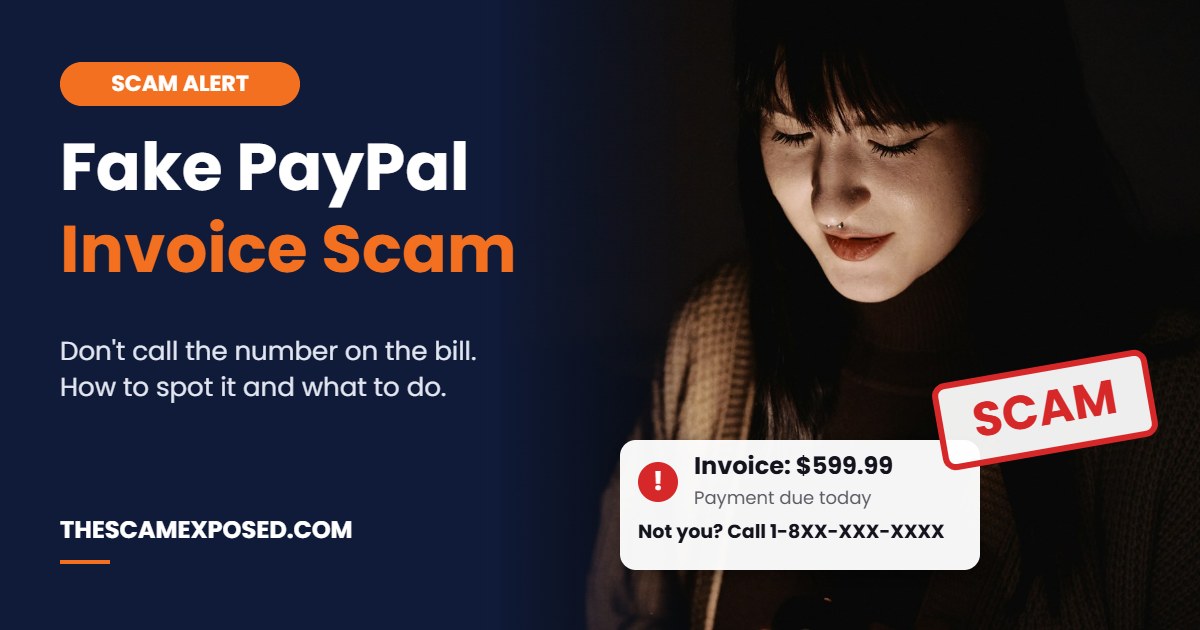
An email arrives that looks like a normal PayPal notice: "You have received an invoice for $599.99, Norton 360 annual renewal." It comes from a real PayPal address. At the bottom, a seller note says the payment will be taken today and gives a phone number to call "if you did not authorize this." You did not buy anything. Your stomach drops, and your hand moves toward the phone. That is exactly the reaction the PayPal invoice scam is built to trigger.
Key takeaways
- The PayPal invoice scam is a fake bill or money request for something you never bought. Its real goal is to get you to pay it or call a fake support number.
- Scammers can send these invoices through PayPal's own invoicing tool, so the email may really come from PayPal. A real sender address does not make the bill real.
- PayPal says not to pay suspicious invoices, not to call phone numbers in the invoice note, and never to send money to a crypto wallet named in an invoice.
- Check your account by typing paypal.com yourself or opening the PayPal app. Never use the links or numbers in the email.
- If you already called, hang up, remove any remote access software, call your bank, and change your PayPal password right away.
On the phone with "PayPal support" right now? Hang up. Do not install anything, read out any code, or let anyone connect to your computer. If you already shared details or sent money, go straight to the step-by-step recovery section.
In this article (16)
- What the PayPal invoice scam is
- Three versions you may see
- How the scam usually goes
- Why the email can come from real PayPal
- Anatomy of a fake PayPal invoice
- What happens if you call the number
- Red flags checklist
- Real PayPal invoice vs scam invoice
- How to check if an invoice is real
- What to do when the invoice arrives
- Already called or paid? Do this now
- Why this scam grows in the holiday season
- Helping a parent or grandparent
- Simple habits that stop most invoice scams
- How we researched this article
- FAQ
What the PayPal invoice scam is
The PayPal invoice scam is a fake bill or money request sent to you for a product or service you never ordered. It usually shows a charge of a few hundred dollars for antivirus software, a computer repair plan, a laptop, a crypto purchase, or a store order. The message says the money is already being taken, or soon will be, and tells you to act quickly.
Most people do not pay the bill. The scammers know that. What they really want is for you to call the "support" phone number listed in the message. Once you are on the phone, a fake agent tries to get your bank login, card number, one-time codes, or remote access to your computer, and then talks you into sending money to "fix" a refund problem.
PayPal describes this type of fraud in its own help center under invoice scams and money request scams. Its advice is simple: don't pay a suspicious invoice, don't call numbers in the invoice note, and check your account only by logging in through the PayPal website or app.
Three versions you may see
PayPal lists three common forms of this scam. They look different, but they all lead to the same trap.
| Version | What you see | The trap |
|---|---|---|
| Real invoice for something you never ordered | A genuine PayPal invoice email from a seller you do not know | You pay it by mistake, thinking you forgot a purchase |
| Real invoice with an alarming note | A genuine PayPal invoice whose seller note says your account was charged or hacked, with a phone number | You call the "support" number and talk to a scammer |
| Fake email made to look like PayPal | A PayPal-style receipt from a non-PayPal address, sometimes with a PDF attached | You click a link to a fake login page or call the number |
How the scam usually goes
The steps are almost always the same, whichever version reaches you:
- The invoice arrives. It shows a charge you do not recognize, often between $300 and $600. That is large enough to scare you but small enough to look like a real subscription or purchase.
- A deadline is set. The note says something like "call within 12 hours" or "the payment will be processed today."
- You call the number. A calm, friendly "PayPal agent" answers and says they can cancel the charge.
- They "verify" you. The agent asks for your login, card number, a code sent to your phone, or asks you to install a support app so they can "see the problem."
- The fake refund. They claim to refund you but say they sent too much by mistake, for example $5,000 instead of $500. Often they have just moved money between your own accounts so it looks like a deposit.
- The money request. They beg you to send the "extra" back by wire transfer, gift cards, Zelle, cash or cryptocurrency, often claiming they will lose their job if you don't.
The invoice is only the bait. The theft happens on the phone.
Got a number from an invoice or receipt? Check the number for free against public FTC complaint records before you think about calling it.
Why the email can come from real PayPal
This is the part that fools careful people. PayPal lets anyone with an account send an invoice or money request. When a scammer sends one to your email address, PayPal itself delivers the notification. That means:
- The sender address can be a real PayPal address, such as [email protected].
- The links in the email can go to the real paypal.com.
- Spam filters often let the message through, because nothing about the email itself is fake.
The fake part is the content the scammer typed in: the seller name, the item, the amount and, most importantly, the note with a phone number. PayPal will not write "call this number" inside an invoice from a stranger. That text comes from the person sending the bill.
Security researchers at Malwarebytes have also tracked invoice campaigns that use no malicious link or attachment at all. Because the only "payload" is a phone number, security tools have little to scan, and more of these emails reach inboxes.
Anatomy of a fake PayPal invoice
Here is what each part of a typical scam invoice is designed to do.
| What the invoice says | What it is really doing |
|---|---|
| "Invoice from Norton / Geek Squad / McAfee" | Uses a brand you have heard of so the charge feels believable. |
| "Amount due: $599.99" | A number big enough to panic you, small enough to seem real. |
| "Payment will be processed within 24 hours" | Gives you no time to stop and check. |
| "If you did not authorize this, call +1-8XX-XXX-XXXX" | Moves you off email and onto a phone call the scammer controls. |
| Seller name like "Mark Billing Dept" or an unrelated small business | Hides who is really behind the bill. |
| Order number, item list, tax line | Adds details that make it look like a real receipt. |
Some kits are so automated that they go out half-finished. Malwarebytes found templates where the phone number spot still showed a placeholder, a clear sign the same message was being mass-produced for many victims.
What happens if you call the number
The person who answers is trained to sound helpful. They may give you a name, an "employee ID" and a case number. Then the call usually turns in one of these directions:
- Remote access. They ask you to install AnyDesk, TeamViewer, UltraViewer or a similar tool "so a technician can cancel the charge." Once connected, they can see your screen, open your bank, and hide what they are doing.
- Card or bank details. They ask for your card number, bank login or the code sent to your phone "to process the refund." That code is often the key to your account.
- The overpayment trick. They show you a fake or moved "refund" that is too large, then ask you to send the difference back by gift card, wire, Zelle or crypto.
- The handoff. They transfer you to a fake "bank" or "government" officer who says your account is under attack and you must move your money to a "safe account."
Every one of these ends the same way: money leaves your account and goes to the scammer. This is the same playbook used in the tech support scams we track. See our guide on tech support scammers who target your bank account.
Red flags checklist
- You never bought it. Real invoices come from businesses you actually dealt with.
- A phone number in the note. A note that tells you to call a number about a charge is a major warning sign.
- A short deadline. "Within 12 hours," "today only," or "to avoid a charge."
- Brand mismatch. A company like Norton or Geek Squad would bill you itself, not through a stranger's PayPal invoice.
- A seller name that does not match the product. A random person or an unrelated small business selling "antivirus."
- A sender address that is not PayPal. Gmail, Outlook or a look-alike domain sending a "PayPal receipt."
- A request for crypto, gift cards or wire transfer. PayPal warns never to send money to a crypto wallet named in an invoice.
- A request for remote access or a one-time code. No real refund needs either.
- The charge is not in your PayPal Activity. If it is not there when you log in yourself, nothing was charged.
Real PayPal invoice vs scam invoice
| Real invoice | Scam invoice |
|---|---|
| From a business or person you know and expected to pay | From a stranger or a business you never used |
| For something you actually ordered | For antivirus, tech support, crypto or electronics you never bought |
| No pressure to call anyone | Urges you to call a number to cancel or dispute |
| You can pay or ignore it calmly | Claims money is already being taken |
| Help comes through the PayPal website or app | "Help" comes through a phone number in the note |
How to check if an invoice is real
Do not use anything inside the email: no buttons, no links, no phone numbers. Instead:
- Open a new browser tab and type paypal.com yourself, or open the official PayPal app.
- Log in and look at your Activity. If a payment really went out, it will be listed there. An invoice or money request is only a request; it asks you to pay, it does not take money on its own.
- Look at who sent it. If the seller is someone you don't know, treat it as a scam.
- Need help? Use the contact options inside the PayPal website or app, never a number from the email or invoice note.
- Check your bank or card statement too, using your bank's app or the number on the back of your card.
What to do when the invoice arrives
- Don't pay it.
- Don't call the number or reply to the email.
- Report the invoice from inside your PayPal account on the website or app.
- Forward the email to [email protected], then delete it from your inbox. This is the reporting address PayPal lists.
- Report it to the FTC at ReportFraud.ftc.gov. Your report helps track the campaign.
- Seeing lots of these? Read our guide to phishing email scams for more ways to spot them.
Already called or paid? Do this now
Move fast and don't feel embarrassed. These scams are run by professionals who do this all day.
You only called and did not share anything
Hang up and block the number. You are most likely fine. Watch your email and phone for follow-up calls, because the same group may try again with a new story.
You let them connect to your computer
- Turn off Wi-Fi or unplug the internet cable right away.
- Uninstall the remote access program they asked you to install.
- Run a full security scan, or have a trusted local repair shop check the computer.
- From a different, safe device, change the passwords for your email, PayPal and bank.
You shared card, bank or login details
- Call your bank or card company using the number on your card. Ask them to block the card and watch for new payees or transfers.
- Change your PayPal password and turn on two-step verification.
- Check your PayPal account for linked cards, bank accounts or email addresses you did not add.
You shared a one-time code
Assume the scammer can get into that account. Change the password immediately, sign out all other sessions, and call the company that sent the code.
You sent money
- Through PayPal: open a dispute in the PayPal Resolution Center as soon as possible.
- By bank transfer or Zelle: call your bank right away and ask for a recall. See our guide for money lost by Zelle or bank transfer.
- By gift card: contact the gift card company with the card numbers and receipt. See what to do after a gift card scam.
- By crypto: contact the exchange you used and keep the wallet address and transaction ID. See lost money to a crypto scam.
Report it
Report to the FTC at ReportFraud.ftc.gov and, for bigger losses, to the FBI at ic3.gov. You can also share your report with us to warn others.
Watch out for a second scam. People who lose money are often contacted by "recovery" services that promise to get it back for a fee. They are scammers too. Read how recovery scams target past victims.
Why this scam grows in the holiday season
Between Black Friday and New Year, inboxes fill with order confirmations, shipping notices and subscription renewals. A fake invoice blends right in, and many people assume they forgot a purchase. Busy shoppers are also more likely to act quickly instead of checking. If you shop online this season, read our full guide to holiday shopping scams and our warning on fake package delivery texts.
Helping a parent or grandparent
Older adults are frequent targets of fake invoice and tech support calls. A few simple steps help:
- Tell them one rule: never call a number written in an email about a charge. Open the app or call the number on the card instead.
- Ask them to call you before paying or "cancelling" anything they don't recognize.
- Set up two-step verification on their PayPal and email accounts.
- Show them what a remote access app looks like, and explain that a real company will never ask them to install one over the phone.
Our tech support scam guide for seniors has more tips you can share.
Simple habits that stop most invoice scams
- Go to the source. For any bill, open the company's app or type its website yourself. Never start from the email.
- Treat phone numbers in emails as untrusted. Use the number on your card, your statement, or the official website.
- Turn on two-step verification for PayPal, your email and your bank.
- Turn on payment alerts in your PayPal and bank apps, so you know within seconds when real money moves.
- Pause before you act. A real charge can be disputed tomorrow. A scam only works if you rush.
- Never install software because a caller asked you to, and never read out a one-time code.
How we researched this article
We reviewed PayPal's official help center guidance on invoice and money request scams, recent threat research from Malwarebytes on fake invoice and refund callback campaigns, a 2026 consumer warning from the Pennsylvania Attorney General, and FTC guidance on reporting fraud. We also compared these with the tech support and refund scam patterns we track in reader reports on The Scam Exposed. Steps for recovery follow official guidance from payment providers and the FTC. Read more about our methodology and editorial policy.
FAQ
What is the PayPal invoice scam?
It is a fake invoice or money request for something you never bought. It tries to scare you into paying it or calling a fake support number, where scammers try to steal your money or account details.
Can I get scammed just by opening a PayPal invoice?
Opening the email or viewing the invoice does not take money. The danger comes from paying it, clicking links in a fake email, or calling the number in the note.
Is an invoice from [email protected] always real?
No. Scammers can send invoices through PayPal's real system, so the email may come from a real PayPal address. Check who the seller is and whether you ever did business with them.
Does PayPal ask you to call a number in an invoice?
No. PayPal tells users not to call phone numbers in the invoice note. Use only the help options inside the official PayPal website or app.
Should I cancel or decline the fake invoice?
You don't need to pay or respond. Log in through paypal.com or the app, report the invoice from your account, and forward any suspicious email to [email protected].
I already paid a fake PayPal invoice. Can I get my money back?
Act quickly. Open a dispute in the PayPal Resolution Center, contact your bank or card company, and report it to the FTC. Faster reports give the best chance of recovery.
How do I report a PayPal invoice scam?
Report the invoice from inside your PayPal account, forward the email to [email protected], and file a report at ReportFraud.ftc.gov.
This guide is based on PayPal's help center article on invoice and money request scams, Malwarebytes threat research on fake invoice callback campaigns (June 2026), the Pennsylvania Attorney General's consumer warning on PayPal invoice scams (2026), and FTC guidance on reporting fraud. It is for general information and is not legal or financial advice. If you lost money, contact your bank and the payment provider directly.
Read next on this topic
 Text Says Your Package Cannot Be Delivered? Do This FirstRead guide →
 Caller Says Your Power Will Be Cut Off? Do This FirstRead guide →
 Check a Charity Before You Give This Giving SeasonRead guide →
 Why Scam Calls Show Your Own Area Code (and How to Stop Them)Read guide →
 2026 US Scam Call Statistics, Real Numbers With SourcesRead guide →
 The Fake Zelle Fraud Alert That Tells You to Send MoneyRead guide →
Share Your Experience
No one has commented yet. If this happened to you as well, say so below. Knowing that other people had the same call makes it far easier for the next person to trust their instincts.
Add Your Comment
Every comment is read by a person before it appears, so it will not show up straight away. Never post your phone number, address, or bank details here.